Saturday, November 22, 2025

Working with Markdown .md Files in the Age of AI Development

 by Steve Endow

[This blog post was 100% human written. None of this post was drafted or written by an AI.]

It seems that Markdown has become the de facto file format when working with AI development tools.  This is not convenient for those of us who work exclusively in the Microsoft ecosystem.

When working with agents in Cursor and VS Code Copilot, you can't feed the agents Word documents or PDF files.  Unfortunately.

It seems the best file format for Product Requirement Documents (PRDs) and other context and guidance files is Markdown, and when saving Agent chats from Cursor, the default file output is also Markdown.  (VS Code Copilot apparently only exports JSON in a horrible structure, which seems like a glaring deficiency.)

So here's my problem:  I normally exclusively use Microsoft Word for requirements, design, proposals, and documentation.  I use Word, my colleagues use Word, and my customers use Word.  This makes sharing and collaboration easy.  And when I want to share a final version of a Word document, I'll just save it as a PDF from Word and email it off, or optionally route the document through DocuSign for client approval.

What does this have to do with Markdown?  Well, as of late 2025, Word doesn't support Markdown.  At all.  It can't read Markdown.  It can't save as Markdown.  It can't convert Markdown to PDF.  So that rules out Word as the editing and viewing tool for Markdown files.  And the bigger hassle is that if I create a requirements document or PRD or SOW in Word, and want to save it as Markdown for use with Cursor, I need to use a Word AddIn or some third party tool to convert the .docx file to a .md file.  I've tried a few options and have not been thrilled with the process or results.

This is definitely a hassle, but a bigger challenge is dealing with updates or revisions.  If I update the Word document following a customer review call, I'd like to have an updated copy of the PRD in an .md file to include in the code repository.  So every single time an update is made to a Word PRD, I have to remember to manually convert the Word contents (somehow!) to an .md file.  And if the Word to .md conversion has any quirks, cleaning up the .md makes the process a no-go for me.  I don't have the time to deal with this and I know that I will not remember to consistently export every Word version to a new Markdown file and then copy it over to the repository.

So for now (as of November 2025), I'm resigned to the fact that I have to deal with Markdown files directly, and not attempt to convert between Word and Markdown.  This brings up new challenges, such as: How do I share these files with a customer? I don't know yet.  My customers definitely won't know how to view or edit an .md file.  How can I get feedback or revisions to a Markdown file from a customer?  Not going to happen.

I looked at several apps for viewing and editing Markdown, but quickly aborted that effort because I recognized it would introduce yet another app into my life.  And I'd have to install it on multiple machines.  I then realized that VS Code is relatively friendly opening Markdown files, so I resigned myself to use VS Code for .md and just learn how to edit and read .md files directly, without a "preview" tool.  It's free, I've got it installed on my dedicated dev machine, desktop, and laptop.  VS Code doesn't solve any of the viewing, sharing, or collaboration requirements, but I figured it might help with my desire to have PRD .md files in SCM and have change tracking.

[Update:  I know there are some VS Code extensions that add various Markdown features.  While searching for a few of them in Cursor, they did not show up in a search. I suspect they are not listed in the (relatively new) Cursor OpenVSX marketplace.  I need to do another search in VS Code to see which ones are available and how they compare to dedicated Markdown editing tools like Typora and Markdown Monster.]

And then yesterday I discovered a new requirement:  How do I share an agent chat?  I had an amazing chat in Cursor, and I wanted to share the entire chat with my colleague.  Fortunately, Cursor makes it very easy to save a chat as Markdown, so I had a great Markdown file.  But my colleague wouldn't know how to view a Markdown file, so I wanted to convert the .md to PDF.  How do I do that?  Yet another tool is required.  Sigh, working with Markdown is a hassle compared to the processes I have for Word files.

So I asked Perplexity, yet again, about Markdown tools.  This time, I specifically asked for tools that can convert Markdown to PDF.  It gave me a few VS Code extensions, which I couldn't find in the new Cursor OpenVSX marketplace.  Sigh.  So then I looked at the Windows apps it recommended.

The top two recommendations were Markdown Monster and Typora.  I've briefly tried Typora before and wasn't too impressed with its minimalism for my particular needs.  So I tried Markdown Monster.  While it doesn't have the nicest user interface (visually cluttered is quite an understatement), it appears to be an incredibly full featured application when it comes to Markdown viewing, editing, and conversion.  I purchased both Typora and Markdown Monster so that I could compare them both for various tasks.

Typora: Super clean, but not as feature rich

Markdown Monster: Fully loaded, with far less emphasis on aesthetics 

After purchasing Markdown Monster, I was able to convert my Cursor .md chat file to PDF.  The PDF output didn't match what I saw in the preview pane in Markdown Monster, so I had to figure out how to change the formatting for PDF exports.  With help from Perplexity, it was easy to modify the CSS used to format exported files, and in a few minutes, I had a nice looking PDF.  While both Typora and Markdown Monster allow you to fully customize every aspect of the formatting, the default PDF format in Markdown Monster was much nicer looking, so I instantly gravitated towards MM for generating PDFs.

PDF export from Markdown Monster, with adjusted font size

Very nice looking default PDF format from Markdown Monster


I sent the truly mind blowing 27 page PDF (not joking, the analysis was beyond amazing) of my Cursor chat to my colleague, so that she could see how amazing the AI agent is when working with Business Central and AL.  And I'm 98% sure she won't actually read it.  But hey, at least I figured out how to convert a .md file to a PDF file.

As for the many other challenges and hassles of working with Markdown files in a Microsoft ecosystem...well, I still have lots to figure out.  I can't imagine how I can use Markdown for SOWs instead of Word--the lack of collaboration is a non-starter.  I'm going to have to think about it.

If you have any suggestions for how to deal with Markdown in the Microsoft ecosystem, I am all ears.  I am getting the impression that this is going to be a major hassle for me as we adopt more AI development processes.

Steve Endow is a Microsoft MVP in Los Angeles.  He works with Dynamics 365 Business Central and related technologies.

You can also find him on X and YouTube, or through these links:  links.steveendow.com 

Tuesday, October 14, 2025

The Two Big Mistakes Made In Business Central Number Series, IMHO

In My Humble Opinion... by Steve Endow

I'm noticing that Business Central number series (No. Series) configuration is apparently not receiving proper attention during implementations.  People seem to be configuring No Series without thinking.

Or even worse, they are using or copying the No. Series values from the Cronus demo company.  Please don't do this.

For example, we just received a support ticket for this message:

Two obvious mistakes were made in this GJNL-PMT number series, IMHO.  Sloppy.

Sunday, April 27, 2025

A Checklist to Complete Before and After Losing Your Cell Phone

 April 26, 2025

If I missed any key points or got any details wrong, let me know.  This post is only for iPhones, since that is what I use and know.  I am not going to attempt to cover Android.

I lost my cell phone in the ocean.  In the middle of my vacation.  In El Salvador.  Fun!

I'm guessing it's one of the least convenient times and places to lose a cell phone.

I thought I was smart by bringing a spare phone with me on the trip, something I've done for several years when I travel overseas.  That spare phone definitely saved the day, but I learned several lessons and discovered a few mistakes I made that cost me time, hassle, and money.

Several of these items relate to filing an insurance claim to replace your phone.  If you don't have phone insurance, then you can potentially skip these.


Things to do BEFORE you lose your phone:

1.  If you have phone Insurance:  Record the exact model number, specs, specific part number, serial number, and IMEI of your phone.  I typically record all of this information in my personal password manager.  I also recommend taking screen shots of the phone info screens and store those images as well.  If you still have the original box for the phone take photos of all of the phone specs and info on the box label as well.  Unfortunately, I forgot to do this for the iPhone 15 that I lost, which has made the insurance claim process a major hassle.  It turns out that my cell phone provider, AT&T, and the insurance company, Asurion, have no idea which specific phone model I was using.  They are completely unable to determine if my iPhone 15 was a 256GB or 128GB model.  And due to this, they have denied my insurance claim for the lost phone.  Even Apple was unwilling to provide me with the specific "part number" of my phone that would allow me to prove the phone storage, even though my Apple account shows me the phone serial number.  Yes, this is beyond absurd.  I was surprised to learn this.

2. If you have phone insurance:  Verify your phone IMEI and unlock status:  This web site provides a free IMEI lookup to verify general phone model (not color or storage), Find My iPhone status, lock status, and blacklist status.

https://www.imeipro.info/check_imei_iphone.html


Monday, March 4, 2024

How many digits can a Business Central Amount field actually support?

 by Steve Endow


(If anyone has a technical explanation for the discrepancy between the Docs and the BC behavior, let me know!)


On Sunday night, as I am prone to do, I was testing something obscure in Business Central Online.

I was checking to see how many digits were supported in a "currency" field, aka an Amount field.  Different numeric fields will have different limitations, but I was specifically interested in the limits of currency amounts.

For instance, if I needed to create a transaction in Venezuelan Bolivars, could Business Central handle a large number of Bolivars?  And could it also handle a large number of Bolivars with "cents"?

500,000 US Dollars is approximately 1.8 trillion Bolivars, give or take


So I entered a really big number in Business Central and saw this error:

Type Decimal

So I learned that the data type is Decimal.  I can never remember the maximum data type values, so I searched for "Business Central decimal data type", which led me to this page:

Thursday, February 22, 2024

Filter by Date Range with Business Central Web API v2.0 - OData date filter syntax

by Steve Endow

I just spent 10 minutes trying to figure out the proper syntax for date filtering with Business Central Web API v2.0 endpoints, so I am documenting it here for future reference.

I don't regularly work with BC Web APIs these days, so when I have to dig back into them every 3-6 months, I'm almost always rusty and have a hard time remembering the URL format and the OData filter syntax used by Business Central Web APIs.

Today I was trying to filter the results returned from the generalLedgerEntries endpoint.  If I try to call that endpoint without a filter, Postman gives me an error because it is returning too much data.

The body of this response was too large to be saved

Fine, let's filter based on postingDate.  But I don't remember the OData filter syntax.  Unfortunately, the OData documentation has ZERO examples of filtering by date.

Thursday, June 1, 2023

Business Central Simple Tip #5: Comment Lines, Standard Text Codes, and Extended Text

by Steve Endow

(Thanks to Kristen Hosman for showing me this feature!)


Business Central has a very cool feature that allows you to add text Comments to transaction lines.  I'm excited about it because I don't believe we had an equivalent feature in the Dynamics GP world.

The feature appears to be well designed and implemented in Business Central, but the official MS documentation on the elements of the features are limited, so I don't think the docs to the feature justice.

There are 3 elements to the overall "feature" in Business Central:

1. Comment Line Type

2. Standard Text Codes

3. Extended Text


Comment Lines

When entering a transaction in Business Central, such as a Sales Invoice, the Line "Type" field can be set to "Comment".  You can then manually enter comment text in the line Description field.  This is the simplest option for ad-hoc comment lines, but the Description field is limited to 100 characters, so if you need more than 100 characters, you would need to add multiple Comment lines.

Sunday, March 5, 2023

Documentation. Documentation? Documentation!

by Steve Endow

How do you create your documentation?  

When do you create your documentation?

Who in your organization creates your documentation?  Who doesn't?

Does anybody actually read your documentation?  How do you know?

Do you specifically budget for documentation in your projects?  How much?

Are your customers reluctant to pay for documentation?

Can your documentation keep up with your software releases?  Do you maintain detailed release notes?

Do you methodically and consistently update your documentation over time?  


Update:  (based on a response from Erik Hougaard on Twitter)

Do you create instructional videos or video tutorials as part of your documentation?  If so, how do you consistently record, edit, store, publish, and index such videos?  Do you have public and private (e.g. customer specific) videos?  If so, how do you handle publishing videos for those different audiences?

By now I'm sure you are excited beyond belief, as there are few topics more glamorous than "documentation".  


Is it read?

Over the last 20 years, I've worked with over 700 customers.  I've documented business processes, business procedures, ERP training guides, user manuals, customization specifications, integration designs, data mappings, installation guides, and software user manuals.

Thursday, January 19, 2023

Business Central Simple Tip #4: Exporting Leading Zeroes to Excel and then CSV- It works fine!

by Steve Endow

This may seem obvious to some, but I've learned through many painful lessons that unless I actually test a scenario and see for myself that it works exactly as desired, it can be dangerous to make assumptions about software functionality and offer promises to customers...


ERP users regularly need to export data to CSV files, and then send or use those CSV files somewhere else. 

A common problem with working with CSV files is that leading zeroes can sometimes be removed by Excel.  This typically occurs when a user opens an existing CSV file, makes a change, and then saves the CSV file.  During that CSV editing process, Excel will typically remove all leading zeroes from field values.

A customer recently asked us to create a custom file export to send to their bank.  They need a list of payments created in Business Central, as well as all of the purchasing invoices that were paid by that payment--essentially a remittance file.

To keep things simple at first, we're looking to create a custom Business Central List Page that has all of the fields the customer needs for their bank.  A user can then just click on the Open in Excel action from the list page to save the data to a file.

Open in Excel from a List Page

Tuesday, January 17, 2023

Business Central Simple Tip #3: Those Role Center "Square Things" - Cues and Action Tiles

by Steve Endow

I was recently researching those "square things" that are displayed on the Business Central Role Center "home" page.

You know, the square things:

"Square Things"

After searching my memory, I recalled they were called "Cues".  As in they provide a visual "cue" with information.

But when I started to research them and how I could create a custom Cue, found an article that mentioned both "Cues" and "Action Tiles".

What?

Thursday, December 29, 2022

Business Central Simple Tip #2: Update AppSource Apps

by Steve Endow

(There is some technical background involved in this Simple Tip, so if I got any details wrong or missed something that is important, please let me know).


Today's Business Central Simple Tip comes from the book Administrating Microsoft Dynamics 365 Business Central Online by Andrey Baludin.

It relates to "AppSource Apps" that are installed in your Business Central Online Environment.  If you have Andrey's book, turn to page 46, and look for the heading "Apps and sessions".

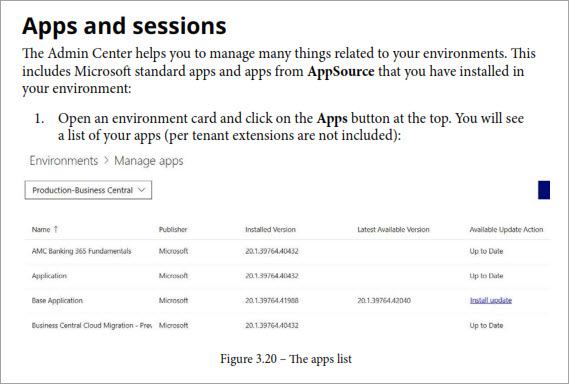
He provides instructions on how to navigate in the Business Central Admin Center to the "Manage Apps" page.  The Manage Apps page lets you see a list of apps that are installed in that particular Environment.

Business Central Admin Center - Manage Apps Page

Wednesday, December 28, 2022

Business Central Simple Tip #1: List Page Search

by Steve Endow

This morning I opened Jeremy Vyska's Your First 20 Hours with Business Central book to see what I could learn.

As I was scrolling through the PDF with my signature Short Attention Span (tm), glancing at the pages, I happened to notice a note.

I don't know why my pre-coffee brain happened to notice this particular note, but I saw that it used the interesting combination of words like "Search", "magic", and "more slowly".

Wait, what is this about?  What Search? 

A Note About Search Performance

So I scroll up to see what he's talking about there, and I see that it's referring to the Search function on the List page.

List Page Search Field

Tuesday, December 27, 2022

My New Criteria for a Password Manager

December 27, 2022

by Steve Endow


On December 22, 2022, LastPass disclosed that they had discovered that an attacker had copied a backup of customer "vault data" following a cyberattack and data breach that occurred in August 2022.

Aside from the obvious bad news, I initially learned of two interesting things about LastPass that I never would have thought to consider when evaluating password managers.

1. While web site username and password values are encrypted, the URL for the web site entry is not encrypted by LastPass.  I believe this poses a security risk for LastPass users.

2. Prior to 2018, LastPass used 5,000 iterations in the key derivation process. In 2018, they increased that to 100,100 iterations.  Even if you don't know what key derivation iterations are, just make note of that significant change.  From what I've read, older vaults were not automatically upgraded to the more secure configuration.  In theory, this means that vaults created prior to the 2018 upgrade are potentially more vulnerable to brute force password cracking.

Sunday, December 18, 2022

Improving Personal Email Security

Updated:  February 19, 2025


by Steve Endow

Last week I discovered that my personal information was included in 2 massive data breaches in under 24 hours.

This was the last straw for me.

Yet Another Data Breach


Background

Data breaches aren't new, and have unfortunately become so common that I don't think they garner any more than an eye roll or a shrug these days.  Here is just a partial list of breaches that occurred in 2022.  I happen to know that December 2022 is missing several significant entries.  And this doesn't include all of the shady data brokers who buy and sell your data constantly.

https://tech.co/news/data-breaches-2022-so-far

I don't see data breaches decreasing any time soon, and I assume that we will continue to see an increasing number of breaches in coming years.  It's going to get far worse before it gets better.

So what does this have to do with email?

The problem is that several of these breaches have included my "personal" email address.  

Wednesday, July 27, 2022

Disable The Annoying Dialog After Posting in Business Central

by Steve Endow

Why does this dialog appear by default after EVERY document posting in Business Central?

This is an annoying dialog

I was recently on a call with my colleague Tanya Henderson to review some accounts payable payment processes in Business Central.

After I posted a purchasing invoice, she told me to click No on this useless dialog, saying that she has to train all of her customers to click no, and she wished she could get rid of it.  

Can this dialog be turned off?  If not, can a PTE suppress it after posting?

Challenge accepted!

Friday, May 20, 2022

Exploring Business Central Custom Table Indexes

by Steve Endow

In my last post, I poked around in SQL to see what custom fields looked like in the database for a Business Central table extension.

While looking into fields, I happened to notice the table index that is automatically created for the table extension.

Automatic Table Extension Index

If we look at this index, we see it is a Clustered Unique index for the "No_" field only.

Default Clustered Index on Table Extension

Why is this default index created automatically?  This Table Keys docs page briefly mentions the default Clustered Index on table extensions.

Wednesday, May 18, 2022

Business Central Custom Fields and Default Field Values

by Steve Endow

When you add new fields to an existing Business Central table, what happens?  

What does Business Central do in the database?  How does Business Central handle default field values?  

I didn't know the answers to these questions, so I decided to do a few tests.  For fun, obvs!

To keep things simple, I created a Table Extension object in AL.  I assume this applies to creating custom tables and adding fields to an existing custom table, but I figured a Table Extension would be simpler and easier to test with, and I learned a few more things about table extensions in the process.

Simple Customer Table Extension 

Thursday, May 5, 2022

Mitigating WiFi deauth attack with Protected Management Frames in Unifi (aka 802.11w Management Frame Protection MFP)

by Steve Endow

Note:  In case the title didn't make it obvious, this post has nothing to do with Business Central.  I wanted to document my learning because I found very little reliable or current information on mitigating WiFi deauth attacks, as of May 2022.  If I got anything wrong or if you find a good resource covering this topic, please post a comment and let me know.


When I'm not trying to learn Business Central, I like to learn about computer security.  I'm not a computer security expert by any means, just someone who finds it interesting as a side hobby.

While learning about password cracking several months ago, I learned about Kali Linux, an amazing distribution that includes lots of different computer and network security tools pre-installed.

In order to learn how to use Kali Linux and the security tools it includes, I decided to try to learn how to crack my WiFi password.  It seemed like a fun exercise, and it was.  But it just happened to teach me something entirely unexpected.

While following the instructions in this "Hacking Wi-Fi" guide (which had some minor omissions--I recommend using this version instead), I was quite surprised when I read this step:

"...disconnect the clients connected to the target network..."

Wait, what?

Friday, April 22, 2022

Power Automate Business Central Journal Line Import Error

by Steve Endow

NOTE:  I'm encountering this error as of April 22, 2022.  If this ends up being a bug in the Power Automate BC connector that is fixed, I'll post an update.


A customer is interested in importing General Journals into Dynamics 365 Business Central using Power Automate.

Simple, right?  Just one Power Automate flow, right?  How hard could it be, right?

Well, it depends.

This is the error that I get in my Power Automate environment.

You must specify a journal batch ID or a journal ID to get a journal line

When I ask why it doesn't work, I get responses that seem to indicate that it should work.

"It works fine for me"

"You must be doing it wrong"

"Did you try doing it this way?"

But no matter what I try, the flow gives me the same error:

ErrorCode: Application_DialogException  You must specify a journal batch ID or a journal ID to get a journal line.  

Thursday, April 7, 2022

Resolving Business Central AL Warning AL0603 - Implicit conversion to a value of type Enum

 by Steve Endow

While copying a standard Business Central Web API page to a new project to create a customized version of the API page, I encountered this compiler warning:


AL0603 - Implicit Conversion to a value of type Enum


An implicit conversion is being performed from a value of type 'Integer' to a value of type 'Enum "Attachment Entity Buffer Document Type"'. This conversion can lead to unexpected runtime issues. This warning will become an error in a future release.AL AL0603
(field) "Document Type": Enum "Attachment Entity Buffer Document Type"


I am vaguely familiar with this error, and I think I resolved it months ago in a different Business Central project, but I completely forgot how I figured it out and how I resolved it.  So I'm writing this post to remind me when I forget again in 6 months.

Friday, March 25, 2022

Getting Access to The Top Secret Business Central Insider Program

by Steve Endow

If you are a Dynamics 365 Business Central developer or ISV, you should definitely get access to the Business Central Insider program.

Business Central Insider Program

I don't know why the BC Insider program is so cumbersome to join, but I'm guessing it involves lots of lawyers. Which is unfortunate, since I think BC Insider is an essential program for any BC developer.

I thought I had a link to the BC Insider program on my BC Resources page, but apparently not, as it seems to require several steps, and is not available through a single URL, unfortunately.

I did a few DuckDuckGo searches, but came up with nothing.  I then did several Google searches, but still couldn't find any Microsoft pages explaining how to join the BC Insider program.

After several searches, I finally found Daniel Rimmelzwaan's excellent blog post from February 9, 2022:

http://thedenster.com/insider-builds-on-collaborate


Thankfully, he documented the process for signing up for Business Central Insider after going through the same puzzling search for one of his clients.  

Working with Markdown .md Files in the Age of AI Development

 by Steve Endow [This blog post was 100% human written. None of this post was drafted or written by an AI.] It seems that Markdown has becom...